This directory contains an Agent Client Protocol (ACP) connector that allows you to run a Python Deep Agent within a text editor that supports ACP such as Zed.
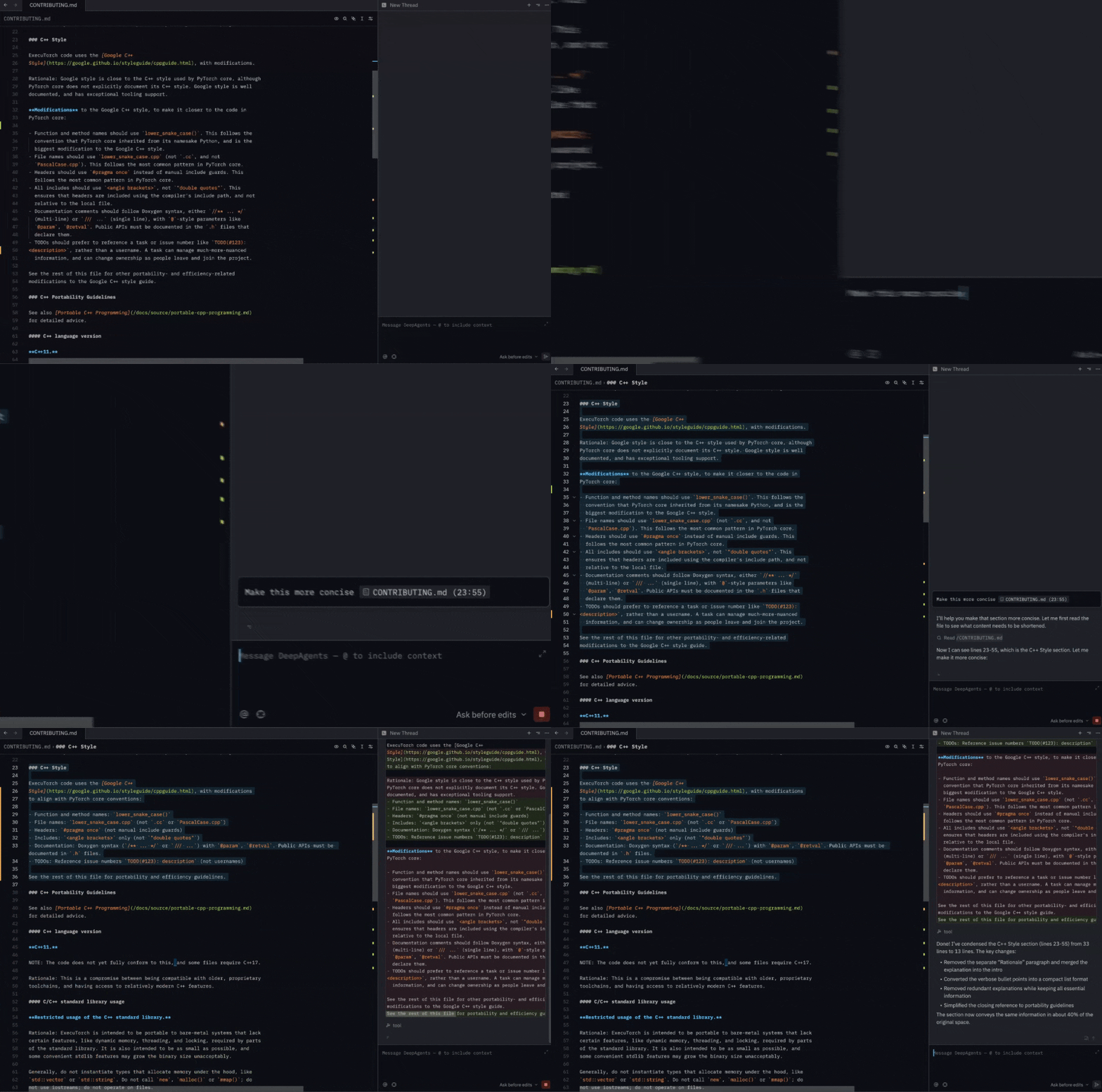
It includes an example coding agent that uses Anthropic's Claude models to write code with its built-in filesystem tools and shell, but you can also connect any Deep Agent with additional tools or different agent architectures!
[!TIP] Want a ready-made coding agent instead of wiring up your own? The
deepagents-codepackage (thedcodeterminal coding agent) can expose its prebuilt coding agent as an ACP server with a single command — no custom agent code required. See Use the prebuilt Deep Agents Code agent (dcode --acp) below. The rest of this guide covers running a bare/general Deep Agent, which does not include thedcodecoding agent.
First, make sure you have Zed and uv installed.
Next, clone this repo:
git clone git@github.com:langchain-ai/deepagents.gitThen, navigate into the newly created folder and run uv sync:
cd deepagents/libs/acp
uv sync --group examples
Rename the .env.example file to .env and add your Anthropic API key. You may also optionally set up tracing for your Deep Agent using LangSmith by populating the other env vars in the example file:
ANTHROPIC_API_KEY=""

# Set up LangSmith tracing for your Deep Agent (optional)

# LANGSMITH_TRACING=true
# LANGSMITH_API_KEY=""
# LANGSMITH_PROJECT="deepagents-acp"
Finally, add this to your Zed settings.json:
{
  "agent_servers": {
    "DeepAgents": {
      "type": "custom",
      "command": "/your/absolute/path/to/deepagents-acp/run_demo_agent.sh"
    }
  }
}
You must also make sure that the run_demo_agent.sh entrypoint file is executable - this should be the case by default, but if you see permissions issues, run:
chmod +x run_demo_agent.shNow, open Zed's Agents Panel (e.g. with CMD + Shift + ?). You should see an option to create a new Deep Agent thread:
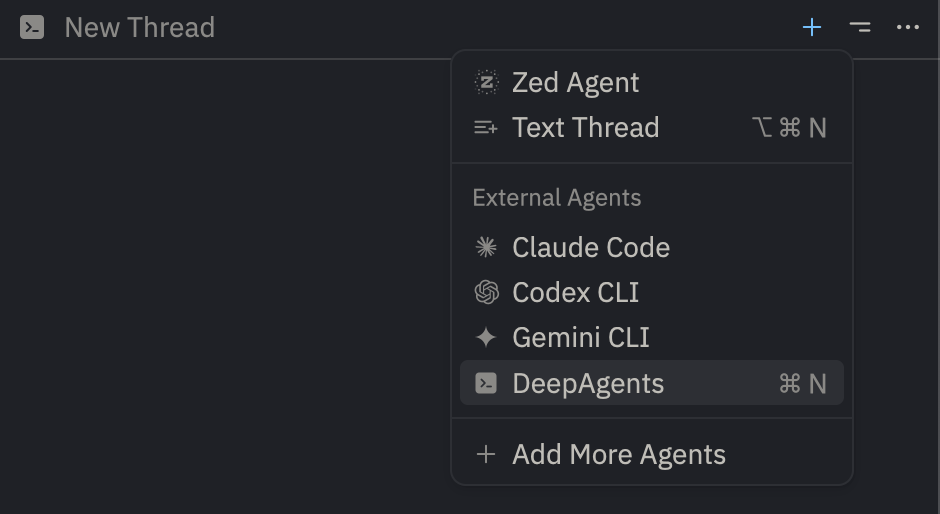
And that's it! You can now use the Deep Agent in Zed to interact with your project.
If you need to upgrade your version of Deep Agents, pull the latest changes and re-sync:
git pull && uv sync --group examplesOr for specific packages:
uv lock --upgrade-package langchain_anthropic # for exampleuv add deepagents-acpimport asyncio
from acp import run_agent
from deepagents import create_deep_agent
from langgraph.checkpoint.memory import MemorySaver
from deepagents_acp.server import AgentServerACP
async def get_weather(city: str) -> str:
"""Get weather for a given city."""
return f"It's always sunny in {city}!"
async def main() -> None:
agent = create_deep_agent(
tools=[get_weather],
system_prompt="You are a helpful assistant",
checkpointer=MemorySaver(),
)
server = AgentServerACP(agent)
await run_agent(server)
if __name__ == "__main__":
asyncio.run(main())AgentServerACP can advertise and implement ACP's session/load capability when the
agent uses a durable LangGraph checkpointer:
server = AgentServerACP(agent, load_sessions=True)The checkpointer must remain available across agent-process restarts. An in-memory
checkpointer is suitable for tests but does not provide restart persistence. On load, the
adapter restores the LangGraph thread, verifies the original working directory, and replays
the conversation to the client through session/update before returning.
uv tool install -U batrachian-toad --python 3.14

toad acp "python path/to/your_server.py" .
# or
toad acp "uv run python path/to/your_server.py" .dcode --acp)If you don't need a custom agent, deepagents-code — the dcode terminal coding agent — can run its prebuilt coding agent as an ACP server over stdio. This ships the full dcode coding agent (filesystem tools, shell, MCP support, and subagents), unlike the bare/general Deep Agent used elsewhere in this guide.
Install deepagents-code together with the ACP dependencies:
uv tool install -U deepagents-code --with deepagents-acpThen point your ACP-compatible editor at dcode --acp. For Zed, add this to your settings.json:
{
  "agent_servers": {
    "Deep Agents Code": {
      "type": "custom",
      "command": "dcode",
      "args": ["--acp"]
    }
  }
}
Select a model by passing --model (in provider:model-name form) to the command:
{
  "agent_servers": {
    "Deep Agents Code": {
      "type": "custom",
      "command": "dcode",
      "args": ["--acp", "--model", "anthropic:claude-sonnet-4-5"]
    }
  }
}
dcode reads provider API keys from the environment (e.g. ANTHROPIC_API_KEY), the same way it does in the terminal. Run dcode --help to see the other flags supported in ACP mode, such as --mcp-config and --no-mcp.
The ACP adapter supports dynamic model switching using Session Config Options. This allows users to switch between different LLM models mid-session without losing conversation history.
from deepagents_acp.server import AgentServerACP, AgentSessionContext

# Define available models
models = [
    {"value": "anthropic:claude-opus-4-6", "name": "Claude Opus 4"},
    {"value": "anthropic:claude-sonnet-4", "name": "Claude Sonnet 4"},
    {"value": "openai:gpt-4-turbo", "name": "GPT-4 Turbo"},
]

# Create an agent factory that uses the model from context
def build_agent(context: AgentSessionContext):
    model = context.model

    # Pass model string directly - it handles provider:model-name format
    return create_deep_agent(
        model=model,
        checkpointer=checkpointer,
        backend=create_backend,
    )

# Pass models to the server
server = AgentServerACP(agent=build_agent, models=models)
You can see a full example here with LangChain's model profile feature.
Convert an ACP text block to LangChain content blocks.
Convert an ACP image block to LangChain content blocks.
Convert an ACP audio block to LangChain content blocks.
Convert an ACP resource block to LangChain content blocks.
Convert an ACP embedded resource block to LangChain content blocks.
Check if a command contains dangerous shell patterns.
Extract all command types from a shell command, handling && separators.
Truncate a command string to a maximum length for display.
Format execute tool result for better display.
Run the test ACP agent server.

