

Menu
Language
Theme
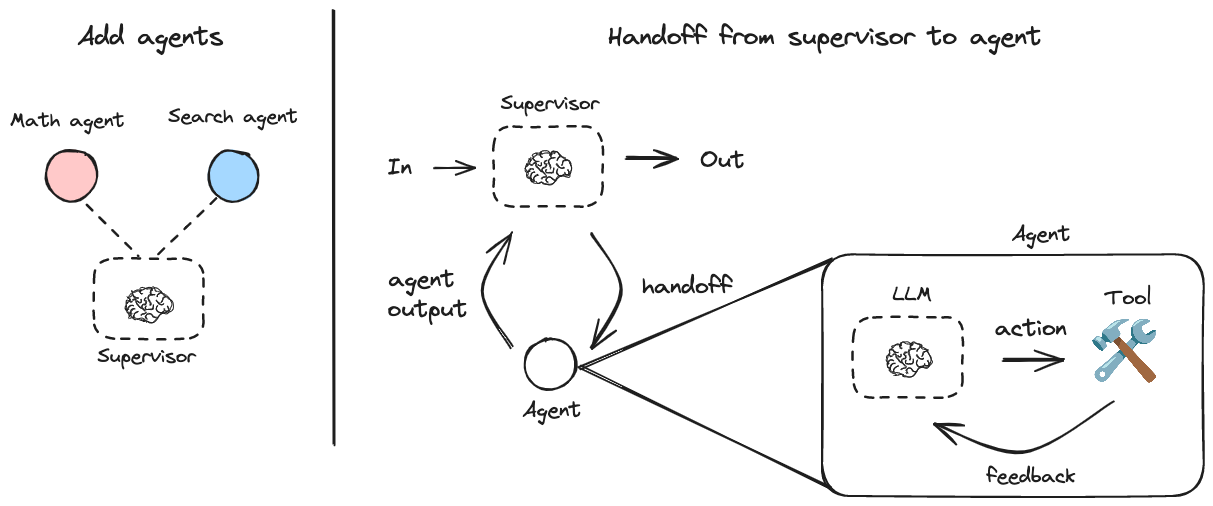
A JavaScript library for creating hierarchical multi-agent systems using LangGraph. Hierarchical systems are a type of multi-agent architecture where specialized agents are coordinated by a central supervisor agent. The supervisor controls all communication flow and task delegation, making decisions about which agent to invoke based on the current context and task requirements.
This library is built on top of LangGraph, a powerful framework for building agent applications, and comes with out-of-box support for streaming, short-term and long-term memory and human-in-the-loop
npm install @langchain/langgraph-supervisor @langchain/langgraph @langchain/coreHere's a simple example of a supervisor managing two specialized agents:
npm install @langchain/langgraph-supervisor @langchain/langgraph @langchain/core @langchain/openai

export OPENAI_API_KEY=<your_api_key>
import { ChatOpenAI } from "@langchain/openai";
import { createSupervisor } from "@langchain/langgraph-supervisor";
import { createReactAgent } from "@langchain/langgraph/prebuilt";
import { tool } from "@langchain/core/tools";
import { z } from "zod";
const model = new ChatOpenAI({ modelName: "gpt-4o" });
// Create specialized agents
const add = tool(
async (args) => args.a + args.b,
{
name: "add",
description: "Add two numbers.",
schema: z.object({
a: z.number(),
b: z.number()
})
}
);
const multiply = tool(
async (args) => args.a * args.b,
{
name: "multiply",
description: "Multiply two numbers.",
schema: z.object({
a: z.number(),
b: z.number()
})
}
);
const webSearch = tool(
async (args) => {
return (
"Here are the headcounts for each of the FAANG companies in 2024:\n" +
"1. **Facebook (Meta)**: 67,317 employees.\n" +
"2. **Apple**: 164,000 employees.\n" +
"3. **Amazon**: 1,551,000 employees.\n" +
"4. **Netflix**: 14,000 employees.\n" +
"5. **Google (Alphabet)**: 181,269 employees."
);
},
{
name: "web_search",
description: "Search the web for information.",
schema: z.object({
query: z.string()
})
}
);
const mathAgent = createReactAgent({
llm: model,
tools: [add, multiply],
name: "math_expert",
prompt: "You are a math expert. Always use one tool at a time."
});
const researchAgent = createReactAgent({
llm: model,
tools: [webSearch],
name: "research_expert",
prompt: "You are a world class researcher with access to web search. Do not do any math."
});
// Create supervisor workflow
const workflow = createSupervisor({
agents: [researchAgent, mathAgent],
llm: model,
prompt:
"You are a team supervisor managing a research expert and a math expert. " +
"For current events, use research_agent. " +
"For math problems, use math_agent."
});
// Compile and run
const app = workflow.compile();
const result = await app.invoke({
messages: [
{
role: "user",
content: "what's the combined headcount of the FAANG companies in 2024??"
}
]
});You can control how agent messages are added to the overall conversation history of the multi-agent system:
Include full message history from an agent:
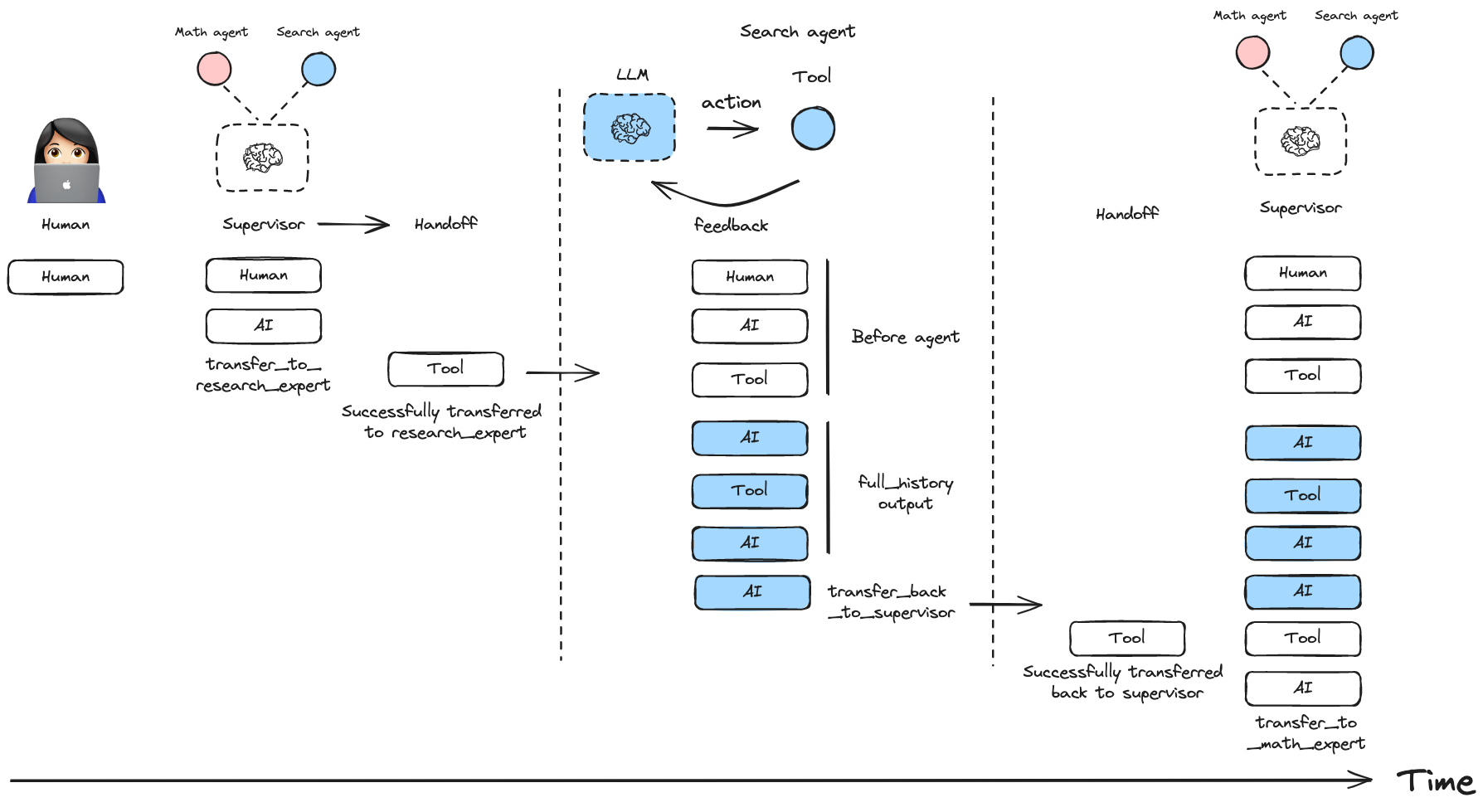
const workflow = createSupervisor({
  agents: [agent1, agent2],
  outputMode: "full_history"
})
Include only the final agent response:
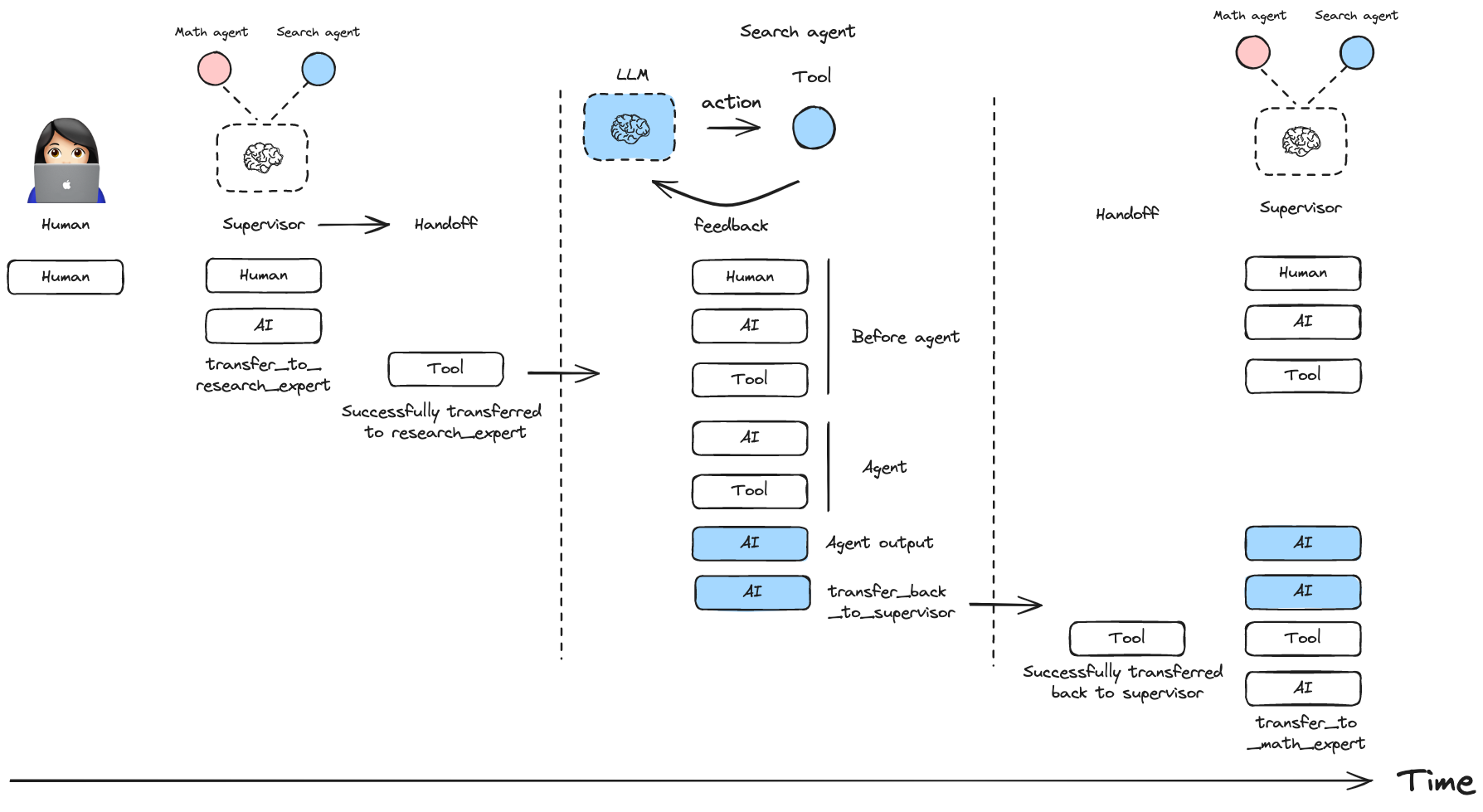
const workflow = createSupervisor({
  agents: [agent1, agent2],
  outputMode: "last_message"
})You can create multi-level hierarchical systems by creating a supervisor that manages multiple supervisors.
const researchTeam = createSupervisor({
  agents: [researchAgent, mathAgent],
  llm: model,
}).compile({ name: "research_team" })

const writingTeam = createSupervisor({
  agents: [writingAgent, publishingAgent],
  llm: model,
}).compile({ name: "writing_team" })

const topLevelSupervisor = createSupervisor({
  agents: [researchTeam, writingTeam],
  llm: model,
}).compile({ name: "top_level_supervisor" })You can add short-term and long-term memory to your supervisor multi-agent system. Since createSupervisor() returns an instance of StateGraph that needs to be compiled before use, you can directly pass a checkpointer or a store instance to the .compile() method:
import { MemorySaver, InMemoryStore } from "@langchain/langgraph";

const checkpointer = new MemorySaver()
const store = new InMemoryStore()

const model = ...
const researchAgent = ...
const mathAgent = ...

const workflow = createSupervisor({
  agents: [researchAgent, mathAgent],
  llm: model,
  prompt: "You are a team supervisor managing a research expert and a math expert.",
})

// Compile with checkpointer/store
const app = workflow.compile({
  checkpointer,
  store
})